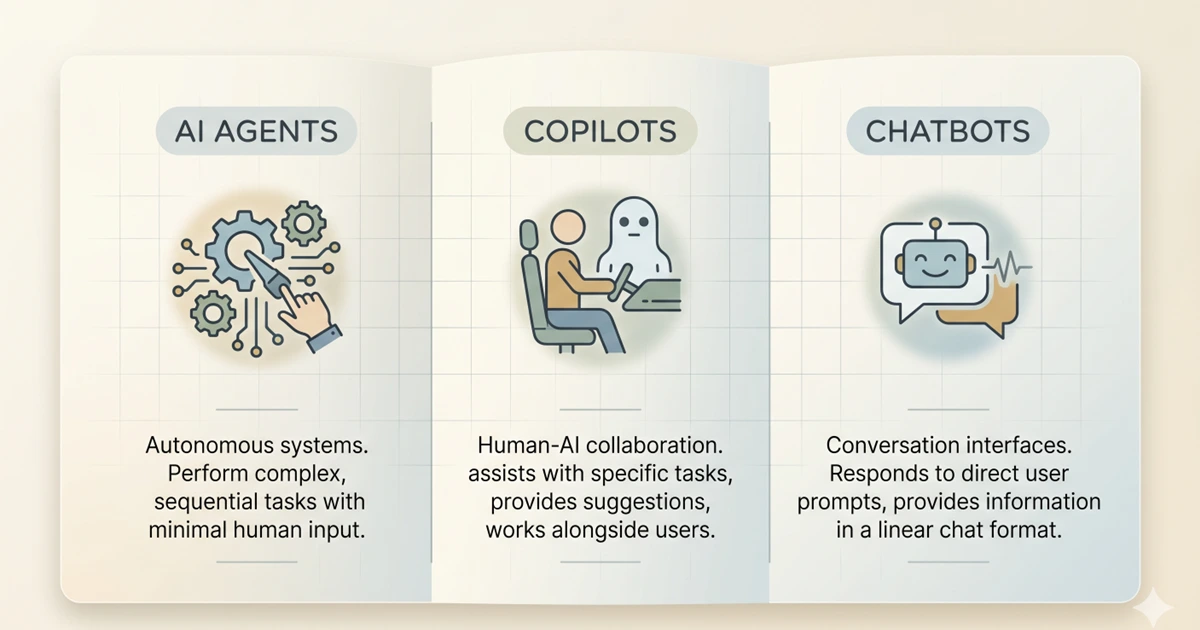
Ask five people in your organisation what an AI agent is and you'll get five different answers. Most of those answers will describe something closer to a chatbot. That might sound like a niche terminology problem — and, to be fair, plenty of people have done excellent work without ever knowing what Nvidia was. But the situation today is slightly different.
Nearly every AI company out there claims to be selling an AI agent. Gartner found that only around 130 of the thousands of vendors claiming agentic AI capabilities are actually genuine. The rest are engaging in what many have dubbed agent washing: rebranding existing chatbots or building a custom ChatGPT wrapper without adding any real agentic capabilities.
When teams can't distinguish between these three categories, they end up applying the wrong oversight to the wrong tools. You can't treat an AI agent like a chatbot and assume a human has reviewed everything before anything happened — meaningful human-in-the-loop oversight works very differently depending on the tool. Without it, a significant accountability gap opens up, which is why getting your AI training right starts with understanding what you're actually deploying. This article explains the three categories in plain terms, illustrates each with examples your team will recognise, and covers what the distinction means for training, oversight, and governance.
The Main Difference Between the Three
Before diving in, here's the core difference — in plain language.
The simplest test is to ask who is holding the steering wheel. Chatbots steer the conversation. Copilots help a person steer their work. AI agents steer workflows, taking real actions across systems when configured to do so.
The governance implication follows directly: the further right you move on that spectrum, the more oversight your organisation needs before deployment, and the more training your team needs to use the tool safely. So which of these three categories are the tools in your organisation actually falling into?
Chatbots: What They Are and Where You See Them
A chatbot is a conversation-first system. Its job is to receive a query, match it to available information, and return a response. It doesn't take actions in other systems. It doesn't remember previous conversations unless specifically designed to. It waits.
Common use cases: customer service FAQs, website navigation assistance, basic troubleshooting, lead qualification, appointment booking. The chatbot optimises the conversation, not the underlying business process.
These tools are more capable than they were two years ago, but they're still fundamentally reactive: nothing happens until someone asks. The training need for chatbots is primarily about knowing what they cannot do — they don't search live systems unless explicitly integrated, they don't act on information, and they can hallucinate confidently in a tone that doesn't signal any uncertainty at all.
Think about the chatbot your IT helpdesk uses to handle password resets. When a user asks it something it wasn't trained on — say, a question about a legacy system access request — what actually happens? Does it escalate to a human, or does it confidently produce an answer that may be wrong? That escalation pathway is the governance question most organisations haven't answered explicitly.
A well-documented illustration: in late 2024, Chevrolet's US dealership chatbot was manipulated by a user into agreeing to sell a new car for $1. The chatbot had been given no guardrails around pricing negotiation and no escalation trigger for anomalous requests. When the screenshot went viral, the dealer couldn't disclaim the chatbot's output — it had appeared on their branded website, in their name. The chatbot's statements were the dealership's statements. That principle applies whether your chatbot is customer-facing or internal, and whether the failure mode is manipulation, misinformation, or a hallucinated policy.
Copilots: What They Are and Where You See Them
A copilot is an AI assistant embedded in the tool the user is already working in. The defining characteristic is placement and human control. A chatbot lives in its own window. A copilot lives inside your editor, your document, your spreadsheet, and sees the context you're working in automatically. That changes what it can do.
Crucially, the human approves every output before it takes effect. The copilot drafts; the human decides. This is the model that Microsoft 365 Copilot, GitHub Copilot, Google Workspace's Gemini features, and Notion AI all use for their core functionality. The AI suggests the next paragraph, the formula, the email reply. You choose whether to use it.
The training need for copilots is the output verification problem. The risk isn't that the copilot acts without permission — it doesn't. The risk is that employees treat its suggestions as correct and accept them without review. More than one in three workers rarely check AI-generated work. A copilot that produces a confident but wrong meeting summary in Microsoft Teams, an inaccurate client email drafted in Outlook, or a flawed financial formula in Excel is still the user's responsibility the moment they accept it.
AI Agents: What They Are and Where You See Them
This is where the terminology matters most, and where confusion creates the greatest risk. An AI agent is an autonomous system that can plan, execute, and adapt multi-step tasks to achieve a defined goal. Unlike chatbots that answer questions or copilots that suggest actions, agents take independent action across multiple systems. They can call APIs, read results, iterate on their approach, and continue working until the task is complete or they hit a policy boundary.
The critical distinction from both chatbots and copilots is this: copilots respond to prompts. Agentic AI executes tasks autonomously when conditions are met. The shift is from assistance to delegation.
In practice in 2026, employees are encountering AI agents in more places than they realise. Moveworks and Aisera handle end-to-end IT service requests, from diagnosing the problem to provisioning access, without a human approving each step. UiPath and Zapier's AI-powered automation are routing, approving, and filing documents across platforms. Glean's enterprise search agents are not just returning results but taking autonomous follow-up actions across connected systems. Legal teams using Harvey AI are running due diligence workflows that span multiple document sets and produce structured output without step-by-step human direction.
The scale of this is accelerating. 40% of enterprise apps will include task-specific AI agents by end of 2026, up from less than 5% in 2025. Many employees are already working alongside agents without knowing it. That's precisely the awareness gap that creates governance exposure.
Here's the question worth asking in your own organisation right now: when Moveworks or a similar IT service agent resolves a ticket and provisions access, is there a log of every decision it made? Is there a defined boundary for the decisions it's allowed to make without human review? If the answers aren't immediately available, that's the governance gap.
Employees working with AI agents need to understand what the agent is authorised to do, its policy limits, how to identify errors, and the escalation pathway. Using a chatbot to draft an email is one skill. Governing an agent that autonomously manages an entire procure-to-pay cycle is a completely different responsibility. And the training for it is categorically different.
The Governance Gap Each Category Creates
The three categories require three different governance responses. Applying the wrong one is where most organisations get into trouble. The most common version: a team adopts an AI agent, governs it like a copilot because it looks similar in the interface, and discovers the gap only after the agent has taken an action nobody intended to approve.
Chatbots require clear escalation pathways and output verification habits. The governance need is human review before acting on chatbot output, and documented processes for when the chatbot can't handle a query. The risk is manageable if these are in place. The Chevrolet chatbot case and the Air India chatbot fare dispute — where courts and tribunals in both cases held the organisation responsible for its chatbot's outputs — show what happens when they're not.
Copilots require output verification standards at the individual level and quality review processes at the team level. Copilots deliver value fastest because they reduce busywork without introducing high action risk. But that low action risk only holds when users are actually reviewing what the copilot produces. When a marketing team uses Microsoft 365 Copilot to draft client proposals, or a finance team uses it to summarise contracts, the review standard needs to be explicit, not assumed.
AI agents require the most substantial governance infrastructure. The more an AI system can act, the more governance it needs. Specifically: defined scope boundaries for what the agent is authorised to do; audit logs of every action taken; human review checkpoints for high-stakes decisions; clear incident response processes; and regular performance monitoring to catch drift. Every action an agent takes must be logged: every query run, every email sent, every update made. Under the EU AI Act deployer obligations, this is a legal requirement for high-risk AI systems, not just good practice. Think of it as the glass box principle — unlike a black box where you can see only the inputs and outputs, a well-governed agent deployment should be fully transparent in its reasoning and every intermediate step. Full operational transparency is what separates genuine AI governance from a nominal audit trail. If your agent deployment doesn't have this, oversight is aspirational rather than real.
How to Tell What You're Actually Dealing With
Vendor marketing is unreliable on this. Every product wants to be called an agent in 2026. The test is capability, not label. Three questions that reveal what a tool actually is:
What This Means for Training
Most enterprise platforms in 2026 operate in more than one of these modes depending on which feature you're using. Microsoft 365 Copilot is primarily a copilot, but its agent features in Copilot Studio can execute autonomous workflows. The same product, different governance requirements depending on the feature. Knowing which mode a specific feature operates in is the practical skill employees and managers need to develop — and the role-by-role training guide covers how that plays out across functions.
| Category | Human control | Examples | Primary training need | Governance requirement |
|---|---|---|---|---|
| Chatbot | Human initiates and acts on output | Ada, Freshdesk Freddy, ServiceNow Virtual Agent | Output verification, escalation pathways | Review before acting, escalation process |
| Copilot | Human accepts or rejects every suggestion | Microsoft 365 Copilot, GitHub Copilot, Google Workspace Gemini | Consistent review habits, domain-specific verification | Output quality standards, team review processes |
| AI agent | System acts autonomously within defined limits | Moveworks, UiPath, Glean, Harvey AI, Zapier AI | Scope boundaries, incident escalation, audit literacy | Action logs, scope limits, human checkpoints, incident response |
Training design, governance policy, and the oversight habits that make AI-assisted work trustworthy all start here. Savia's AI literacy learning paths are built to develop exactly this kind of practical judgment across every level of your organisation.